Input Panel
The Input panel contains the inputs required by the selected classifier, including the classifier engine and its parameters, as well as the dataset(s), segmentation labels, and masks — that are used to train the classifier.
Click the Input tab on the Segmentation Trainer dialog to open the Input panel, shown below.
Input panel
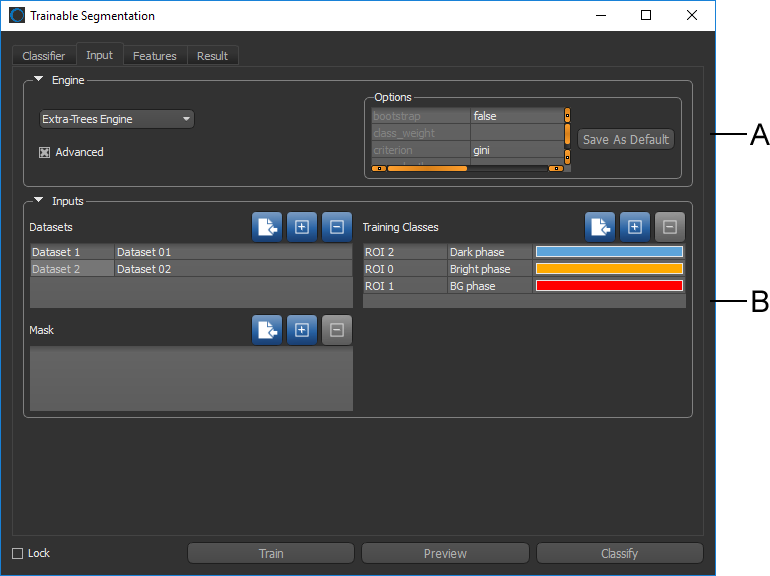
A. Classifier engines B. Classifier inputs
 Classifier Engines
The available classifier engines and their settings are accessible in the top section of the Input panel.
Check the Advanced option to view the parameters associated with the current classifier engine. You can modify the parameters for the current classifier engine, as well as save your modifications as the default settings. See Classifiers List for information about the files saved with each classifier. The default engine parameters are saved for each available engine in the root directory C:\ProgramData\ORS\DragonflyXX\Data\OrsTrainer\Classifiers with a *.segParam extension.
Classifier engine

You should note the following when you select a classifier engine:
- Each engine will react differently to the same inputs.
- Trying different engines will most likely highlight the best choice for a given dataset.
- Changes you make to an engine are saved automatically with the model. You can also save your changes as the default configuration of an engine.
- The inputs to the classification engine will have a big influence on the resulting classification, especially the number of estimators. Too few estimators won’t train the engine enough, but too many may over train it. Both conditions may result in poor classification.
|
|
Description |
|---|---|
|
K-Nearest Neighbors* |
Implements learning based on the k nearest neighbors of each query point, where k is the specified integer value. The optimal choice of the value k is highly data-dependent. In general a larger k suppresses the effects of noise, but makes the classification boundaries less distinct. |
|
Ensemble Methods |
The goal of ensemble methods is to combine the predictions of several base estimators built with a given learning algorithm in order to improve generalizability and robustness over a single estimator. REF: http://scikit-learn.org/stable/modules/ensemble.html Random Forest… A Random Forest is a meta estimator that fits a number of decision tree classifiers on various sub-samples of the dataset and uses averaging to improve the predictive accuracy and control over-fitting. The sub-sample size is always the same as the original input sample size but the samples are drawn with replacement if REF: http://scikit-learn.org/stable/modules/generated/sklearn.ensemble.RandomForestClassifier.html AdaBoost… An AdaBoost classifier is a meta-estimator that begins by fitting a classifier on the original dataset and then fits additional copies of the classifier on the same dataset but where the weights of incorrectly classified instances are adjusted such that subsequent classifiers focus more on difficult cases. REF: http://scikit-learn.org/stable/modules/generated/sklearn.ensemble.AdaBoostClassifier.html Bagging… A Bagging classifier is an ensemble meta-estimator that fits base classifiers each on random subsets of the original dataset and then aggregate their individual predictions (either by voting or by averaging) to form a final prediction. Such a meta-estimator can typically be used as a way to reduce the variance of a black-box estimator (e.g., a decision tree), by introducing randomization into its construction procedure and then making an ensemble out of it. REF: http://scikit-learn.org/stable/modules/generated/sklearn.ensemble.BaggingClassifier.html Extra Trees… This classifier implements a meta estimator that fits a number of randomized decision trees (also known as extra-trees) on various sub-samples of the dataset and uses averaging to improve the predictive accuracy and control over-fitting. REF: http://scikit-learn.org/stable/modules/generated/sklearn.ensemble.ExtraTreesClassifier.html Gradient Boosting… Builds an additive model in a forward stage-wise fashion; it allows for the optimization of arbitrary differentiable loss functions. In each stage n_classes_ regression trees are fit on the negative gradient of the binomial or multinomial deviance loss function. Binary classification is a special case where only a single regression tree is induced. REF: http://scikit-learn.org/stable/modules/generated/sklearn.ensemble.GradientBoostingClassifier.html |
* Neighbors-based classification is a type of instance-based learning or non-generalizing learning that does not attempt to construct a general internal model, but simply stores instances of the training data. Classification is computed from a simple majority vote of the nearest neighbors of each point: a query point is assigned the data class which has the most representatives within the nearest neighbors of the point.
** Two families of ensemble methods are usually distinguished — Averaging and Boosting.
- In averaging methods, such as Bagging and Random Forest, the driving principle is to build several estimators independently and then to average their predictions. On average, the combined estimator is usually better than any of the single base estimator, because its variance is reduced.
- By contrast, in boosting methods like AdaBoost and Gradient Boosting, base estimators are built sequentially and one tries to reduce the bias of the combined estimator. The motivation is to combine several weak models to produce a powerful ensemble.
Classifier Inputs
Inputs associated with the current classifier — Datasets, Segmentation Labels, and Masks — are displayed in tables, as shown below. Adding or removing inputs can be done by clicking the Add and Remove buttons.
Classifier inputs
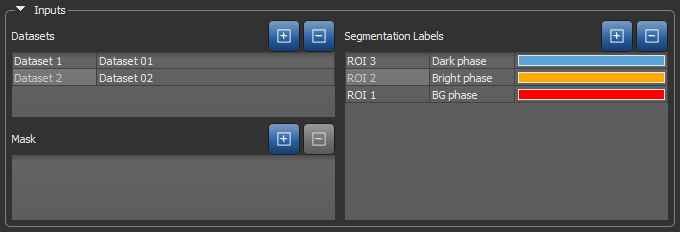
The first column of an input table is an editable descriptive name that will be saved with the model. The second column is the name of the input that was added to the classifier from the Data Properties and Settings panel. When a saved classifier is loaded, only the first column will be filled. You will then need to add the required inputs to segment a dataset or to modify the classifier.
|
|
Icon |
Description |
|---|---|---|
|
Add |
|
Adds the selected dataset(s) or region(s) of interest from the Data Properties and Settings panel. NOTE You can only import a region of interest as a segmentation label or mask if it has the same size and shape as the dataset(s) with which you are working and contains labeled voxels. |
|
Remove |
|
Removes the selected input(s). |

 Datasets
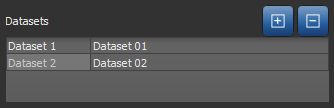
Datasets, also known as channels, are mandatory to train a classifier and subsequently segment a dataset since they form the base of the features tree. Different features can be extracted from the dataset to first train the classifier and then segment the dataset based on those features. See Features Panel for information about the features tree.
Datasets inputs
Segmentation Labels (ROIs)
Segmentation labels, which are mandatory to train a classifier, spatially define the pixels used for training. These training regions of interest are dependent on the dataset and the element to segment in it. They must be representative of the whole dataset, but it is not recommended to have large training ROIs since it will take long to train the classifier and it might lead to over training. Once a classifier has been trained, it is possible to segment a dataset without importing any segmentation labels.
Refer to the topics in Segmentation for information about creating and managing ROIs. You can use the Using the ROI Painter Tools to create the required segmentation labels.
Training is always done on the image plane and all segmentation labels must be created on that plane.
Segmentation Labels for Pixel-Based Training
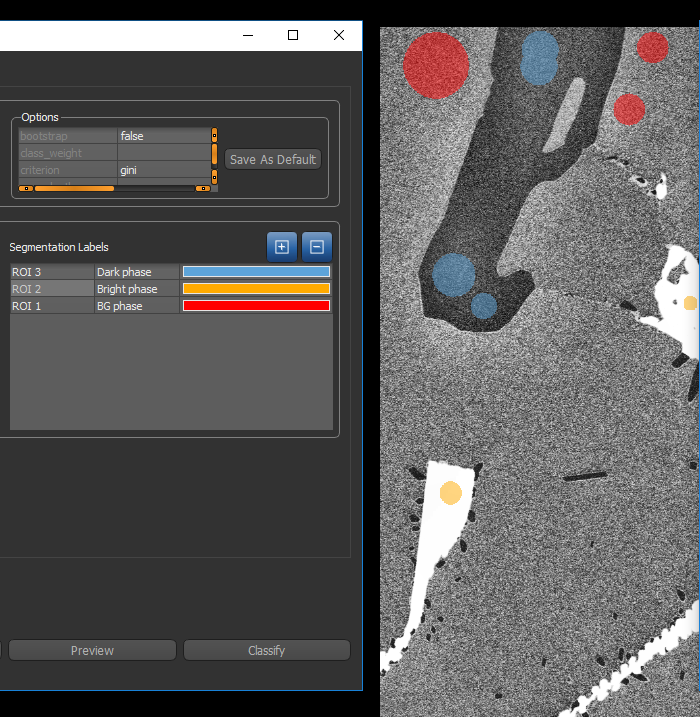
The figure below shows an example of segmentation labels provided to the classifier for pixel-based training.
Segmentation labels for pixel-based training
Segmentation Labels for Region-Based Training
The figure below shows an example of segmentation labels provided to the classifier for region-based training.
Segmentation labels for region-based training
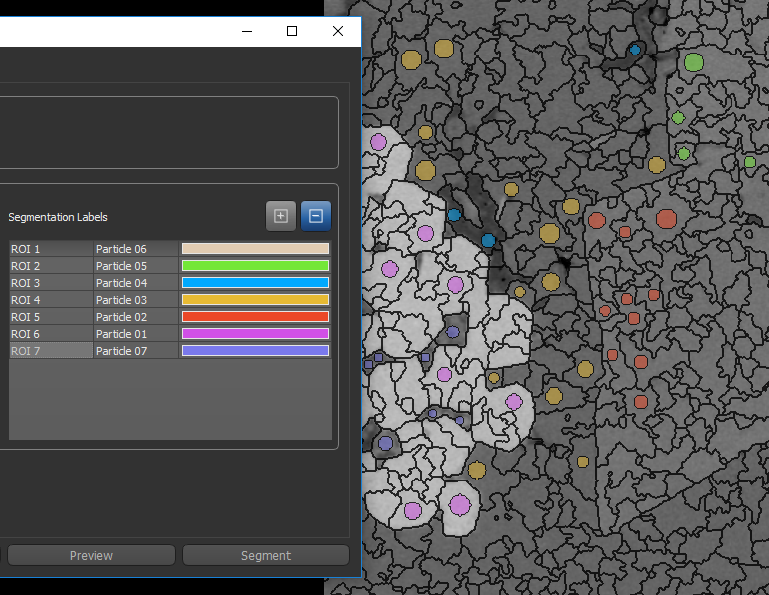
Whenever you create segmentation labels for region-based training, you must ensure that the region of interest of one class does not overlap the region of another class. If required, you can generate the regions prior to creating the segmentation labels. Refer to the instructions How to Generate a Region for information about selecting region generators and generating regions.
Masks
Masks, which are optional, can be added as an input to define the working space for the trainer. Masks, which must include all of the segmentation labels, can help reduce training times and increase training accuracy. Without a mask, the whole dataset(s) will be used for training.
Mask inputs
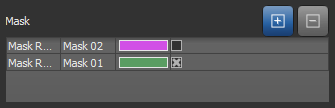
You can check or uncheck a mask to enable or disable the mask region at any step in the training process.